


The new Messenger 9.0 now fully supports having URLs in your Personal Message. Any web addresses you place in your message automatically become clickable links, quite handy!
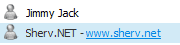
Live web links are displayed in a blue color with an underline, the URL will be opened in your default browser when clicked. Links are also clickable in the IM window, Contact card, the contact details editor window and the address also becomes blue when you start typing it in the personal message box. URLs will also be hotlinks in the personal messages of offline contacts, so that your friends can click your links even if they don't see you online. Although this is not a huge new feature, it will certainly make things a lot easier for users who enjoying sharing web links through their contact lists.
More about Personal status messages
Since they were added in MSN Messenger 7, "Personal Messages" quickly became a way for users to share URLs to things like pictures, blogs, news items, competitions, petitions, YouTube videos, MySpace profiles, and so on. This feature was originally meant to accommodate users who enjoyed sharing things such as jokes or a funny status message, but many people included links in their messages. The fact that the links were not clickable (in MSN 7 and Live Messenger 8) made it hard to use these links; they had to be manually copied and pasted in a browser.
It should also be noted that this is not a totally new idea, Google Talk has had such a feature for some time. This new functionality should serve as a good incentive for users to write their daily status messages in the PSM area and not their MSN name. If for some reason one of your contacts includes a URL in their screen name, you can copy it by reading this article on how to steal and copy contact names (works in Messenger 9.0 and 8.x).
Write a Comment
Tags: Messenger, 9.0, Personal, Message, Link, Address, Click


User comments
what the? whats up peeps
babee, you broke my heaart, big timee. i wish we coould go back wheen it was YOU + ME
Could Someone do A: 'measy' in small like 'ᵇᵅᵇᵞ' Please? (ASAP)
-Thanks for the help!
Amy xoxoxo
How to you make Chance in cool letters
I'm bored, what's up people?
綇䂢𠕱詫評詫㓉ऱ𠿱綥ኵ뫸ͮ슸͏终ጞ
this is a lot of signs from the chinese languange
like msn it is pretty fun but if the ones you want are not online then it is BORING!!!
I Love MSN Programes
but they are sometimes rude
is there PLUS for msn 9 ?
You just enter the text that starts with http and it'll be turned into a link automatically in messenger.
How do u put links on personal messages?
I love the new PSM links, always put some naughty and weird things in there :P